

What is a custom third-level domain
A custom third-level domain is a unique branded name that identifies a website. For example,members.coworkingspace.com or residents.coworkingspace.com are custom domains for the coworking space app. For this, it’s enough to create a subdomain using a domain you already own. Some common choices for the subdomain to use:
- members
- portal
- community
- residents
- app
Set up a custom domain
Before setting up a custom third-level domain in RNTOR, you must complete the setup on your domain registrar’s side.In your domain registrar account
- Log in to your domain registrar account.
- Open the DNS control panel.
- Create a new record with the following data:
Double-check the correctness of the data. Instructions for common registrars:
In RNTOR
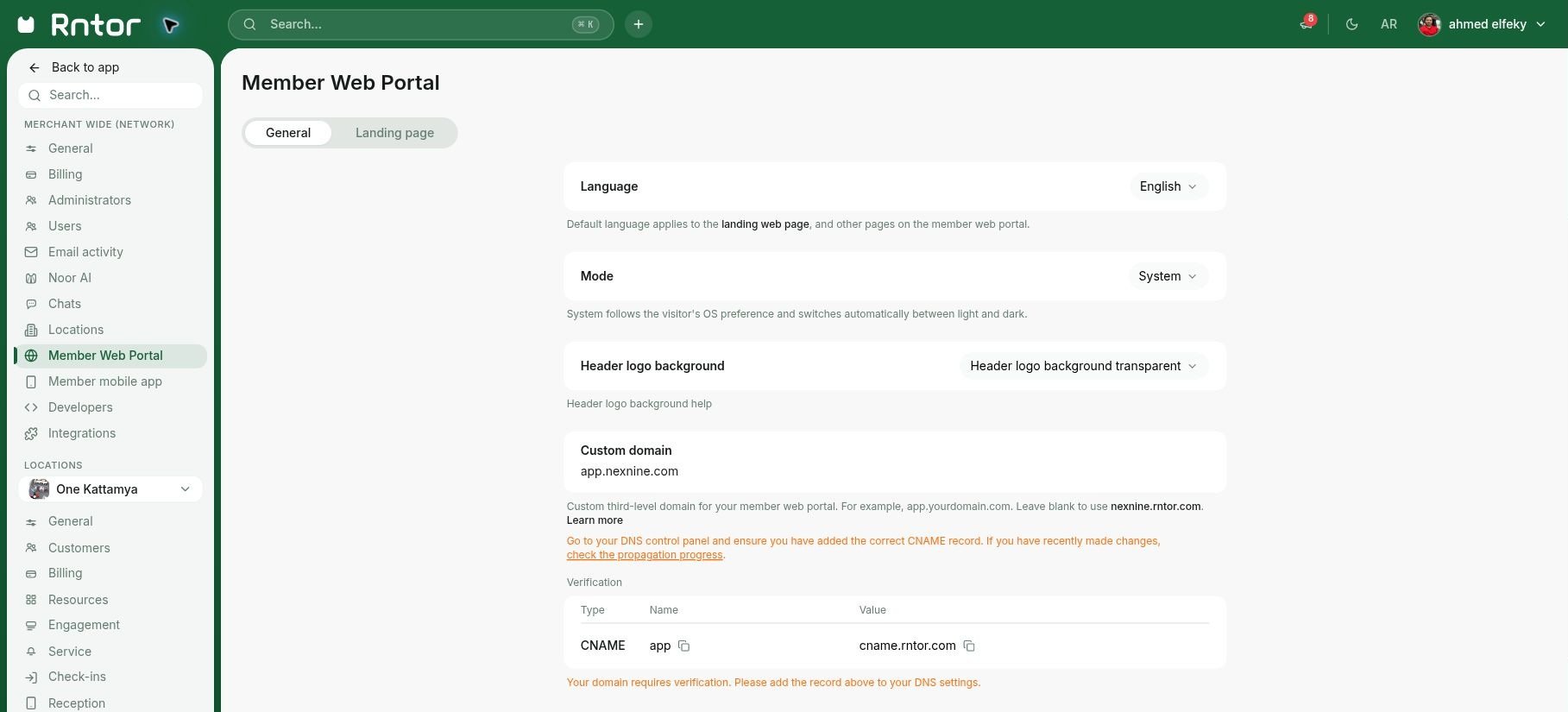
After the setup is complete on the side of your domain registrar, please follow the steps below to configure a custom third-level domain for member web portal:- Sign in to RNTOR as the owner and open Settings for your Live network.
- Open Member web portal > General.
- Enter your full custom third-level domain in the Custom domain field. For example,
members.coworkingspace.comorapp.coworkingspace.com. If a Verification section appears after you add the domain, add the required record to your DNS settings to complete the process.
Verify the setup
Once DNS records have been changed, they can take some time to propagate, which means global DNS providers recognize they have been changed. Unlike nameserver changes, which can take up to 48 hours to propagate, the propagation of CNAME records is usually very quick. To verify the setup on your end, go to the member web portal and see it working under your custom third-level domain. A custom domain added to your member web portal will appear unverified until this process is complete and full propagation is achieved.The owner of RNTOR can check the propagation progress by clicking Check the progress of propagation under the Custom domain field. The button redirects you to the DNS Checker website, where you can click Search and see if the propagation is complete.
Migrate the domain name to a different hosting provider
If you are changing the hosting provider, you need to make the following changes to your currently configured custom domain to ensure having the same domain:- Go to the DNS panel of your new hosting provider and create a record for a custom domain on the new hosting site.
- Delete the previously created DNS records on the old hosting site.
Change the domain name
If you’re changing your domain name, you need to follow these steps:- Open the DNS panel of your hosting provider and create a new record for your new domain.
- Add a new record to RNTOR on Settings > Member web portal > General tab > Custom domain field.
- Delete an old record created for the old domain.
Troubleshoot issues with custom domain
If your member web portal is not accessible under your custom domain, check the following:1. A temporary issue on the side of your domain provider
1. A temporary issue on the side of your domain provider
- Your domain provider may have had a temporary technical issue, due to which your domain didn’t work.
- Additionally, the domain may work without interruptions in your country but experienced temporary unavailability in other regions due to DNS resolution.
2. Wrong settings of the CNAME record for your custom domain.
2. Wrong settings of the CNAME record for your custom domain.
A record you created in your domain’s DNS panel may have been configured incorrectly.Visit the domain registrar, go to the DNS panel, and check if the CNAME record is configured as follows.
3. Your custom domain is not added to the Custom Domain field in RNTOR
3. Your custom domain is not added to the Custom Domain field in RNTOR
A record you created in your domain’s DNS panel wasn’t added to the Settings page in RNTOR.An owner must go to the Settings > Member web portal > General page, and check if the right third-party custom domain is added there.If it was removed by mistake, the member web portal won’t work under the custom domain URL.
FAQs
Why doesn't my custom domain work?
Why doesn't my custom domain work?
Learn more about potential causes in the Troubleshoot issues with custom domain section above.