> ## Documentation Index
> Fetch the complete documentation index at: https://docs.rntor.com/docs/llms.txt
> Use this file to discover all available pages before exploring further.
# Overview
> Overview of the admin experience in Rntor
Welcome to the Rntor admin portal. Think of it as the digital backend for running your space. Rntor's **admin web portal** is designed for complete desktop management, while the **admin mobile app** will help you handle tasks on the go.
Here is a quick overview of how to get in, navigate the platform, and manage your space with confidence.
## Admin web portal
1. Go to [app.rntor.com](https://app.rntor.com).
2. Enter the email associated with your admin account and verify it with the confirmation code.
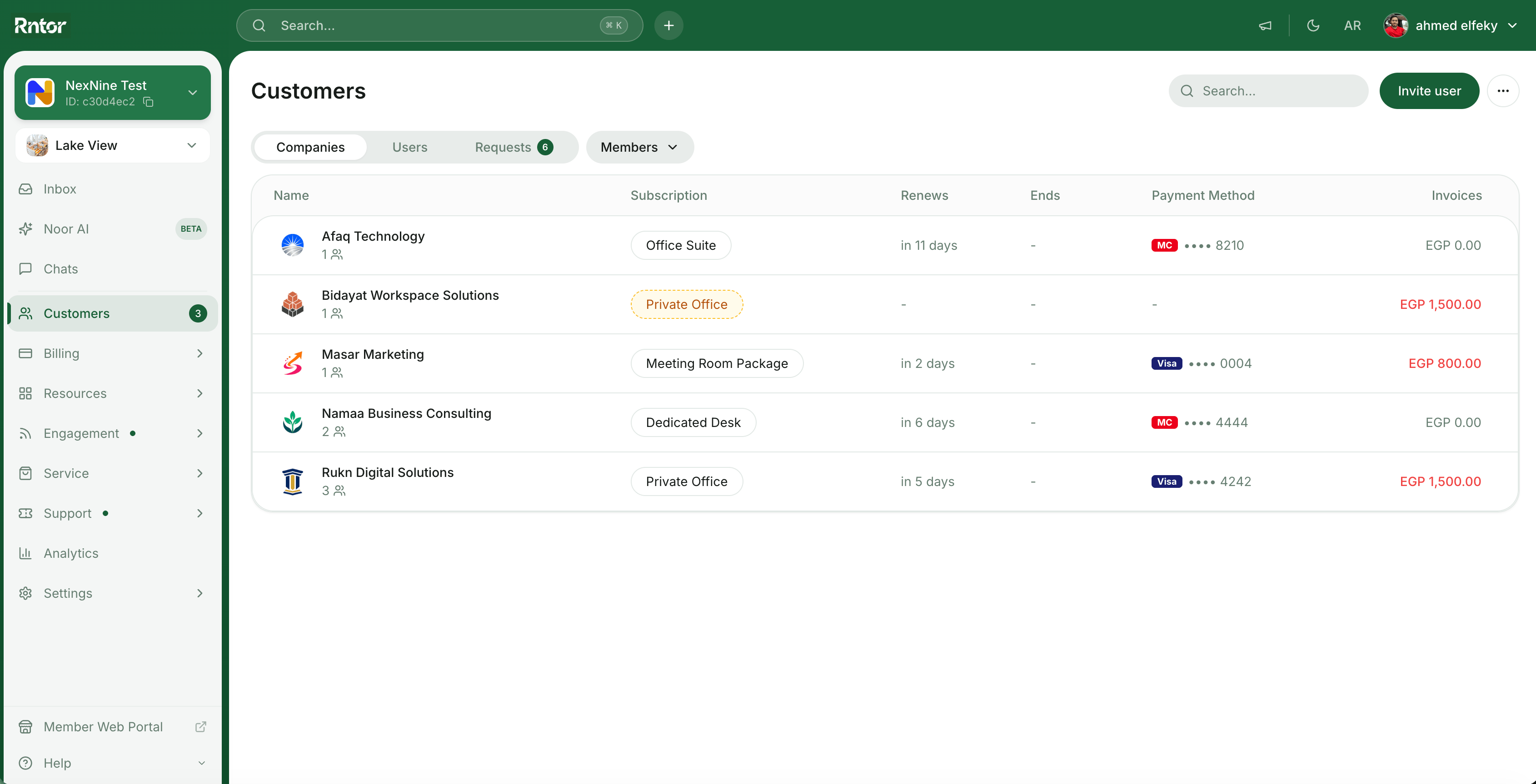 Your main control center is the left-side navigation panel. Here is a quick breakdown of where to find exactly what you need.
| Module | What you will do here |
| -------------- | -------------------------------------------------------------------------------------------------------------------------------------------------- |
| **Locations** | Switch between locations if your network has multiple spaces. |
| **Customers** | Your customer directory. View and manage companies, members, and nonmembers with their info neatly organized by profiles. |
| **Billing** | Your financial hub. Create and manage contracts, subscriptions, invoices, and transactions. Set up your membership plans, packages, and discounts. |
| **Resources** | Your space inventory. Add all rooms, desks, private offices, parking lots, and equipment, and manage their bookings or rentals. |
| **Engagement** | Your community builder. Curate the community feed and events. |
| **Service** | Your extra offerings. Run a shop for additional products and services, maintain a benefits catalog with member perks, and track members' visitors. |
| **Support** | Your help desk. Handle customer feedback and requests, and build out your member guides. |
| **Analytics** | Reports and insights into your space performance. |
| **Settings** | Configure your network, locations, and admin preferences. |
| **Noor AI** | Rntor's AI assistant (beta) to help automate tasks and surface insights. |
Instantly jump to any page or trigger actions (like "invite user" or "create company") using the command palette.
* **Windows:** Press `Ctrl + K`
* **macOS:** Press `⌘ + K`
## Admin mobile app
The Rntor admin mobile app helps you stay on top of your space while away from your desk — approve requests, check bookings, and respond to members from anywhere.
## FAQs
Here's how to get started with Rntor as a new administrator:
1. Log in to [app.rntor.com](https://app.rntor.com) using your administrator email address.
2. Check out our [Overview](/docs/admin/overview) guide to understand the functionality and navigation in the Rntor admin portal.
3. Browse the rest of the **Admin experience** section for detailed setup of each module.
**Additional resources:**
* Browse our [Docs](/docs/introduction) for detailed explanation and setup of any functionality.
* Contact [support@rntor.com](mailto:support@rntor.com) for help from our team.
* **Unable to see admin features?** Double-check that you are signed in to the admin portal and not the member portal.
* **Lost access?** Regain your admin role by clicking on the settings **> Merchant wide settings > Locations >** `Become administrator` button next to the needed location. Then, go to **Customers >** open your profile **>** check the "Activities" section to identify who removed your admin role.
Your main control center is the left-side navigation panel. Here is a quick breakdown of where to find exactly what you need.
| Module | What you will do here |
| -------------- | -------------------------------------------------------------------------------------------------------------------------------------------------- |
| **Locations** | Switch between locations if your network has multiple spaces. |
| **Customers** | Your customer directory. View and manage companies, members, and nonmembers with their info neatly organized by profiles. |
| **Billing** | Your financial hub. Create and manage contracts, subscriptions, invoices, and transactions. Set up your membership plans, packages, and discounts. |
| **Resources** | Your space inventory. Add all rooms, desks, private offices, parking lots, and equipment, and manage their bookings or rentals. |
| **Engagement** | Your community builder. Curate the community feed and events. |
| **Service** | Your extra offerings. Run a shop for additional products and services, maintain a benefits catalog with member perks, and track members' visitors. |
| **Support** | Your help desk. Handle customer feedback and requests, and build out your member guides. |
| **Analytics** | Reports and insights into your space performance. |
| **Settings** | Configure your network, locations, and admin preferences. |
| **Noor AI** | Rntor's AI assistant (beta) to help automate tasks and surface insights. |
Instantly jump to any page or trigger actions (like "invite user" or "create company") using the command palette.
* **Windows:** Press `Ctrl + K`
* **macOS:** Press `⌘ + K`
## Admin mobile app
The Rntor admin mobile app helps you stay on top of your space while away from your desk — approve requests, check bookings, and respond to members from anywhere.
## FAQs
Here's how to get started with Rntor as a new administrator:
1. Log in to [app.rntor.com](https://app.rntor.com) using your administrator email address.
2. Check out our [Overview](/docs/admin/overview) guide to understand the functionality and navigation in the Rntor admin portal.
3. Browse the rest of the **Admin experience** section for detailed setup of each module.
**Additional resources:**
* Browse our [Docs](/docs/introduction) for detailed explanation and setup of any functionality.
* Contact [support@rntor.com](mailto:support@rntor.com) for help from our team.
* **Unable to see admin features?** Double-check that you are signed in to the admin portal and not the member portal.
* **Lost access?** Regain your admin role by clicking on the settings **> Merchant wide settings > Locations >** `Become administrator` button next to the needed location. Then, go to **Customers >** open your profile **>** check the "Activities" section to identify who removed your admin role.