> ## Documentation Index
> Fetch the complete documentation index at: https://docs.rntor.com/docs/llms.txt
> Use this file to discover all available pages before exploring further.
# Auto-assign and auto-reply to support tickets
> Enable Noor AI for Support to auto-assign and auto-reply to support tickets, reducing your team’s workload, and learn how to train it.
Enable the Noor AI agent to assist your team in handling support tickets. Noor AI responds to newly created tickets and automatically assigns them to the right administrators, ensuring your customers receive 24/7 assistance. By learning from your guides and previous ticket resolutions, it provides customers with instant, helpful answers.
Noor AI is currently free while in beta. It will become a paid add-on.
## Enable Noor AI for Support
1. On the left-side panel, click the **(...)** next to your location name.
2. Go to **Location settings > Support**.
3. Find the **Noor AI** section.
4. **Assign tickets:**
* Choose **Auto-assign** to allow Noor AI to auto-assign tickets to relevant administrators.
* Choose **No action** if you prefer to do it manually.
5. **Reply to tickets:**
* Choose **Auto-reply** to allow Noor AI to reply to customer support tickets.
* Choose **No action** if you want to restrict Noor AI from replying to support tickets.
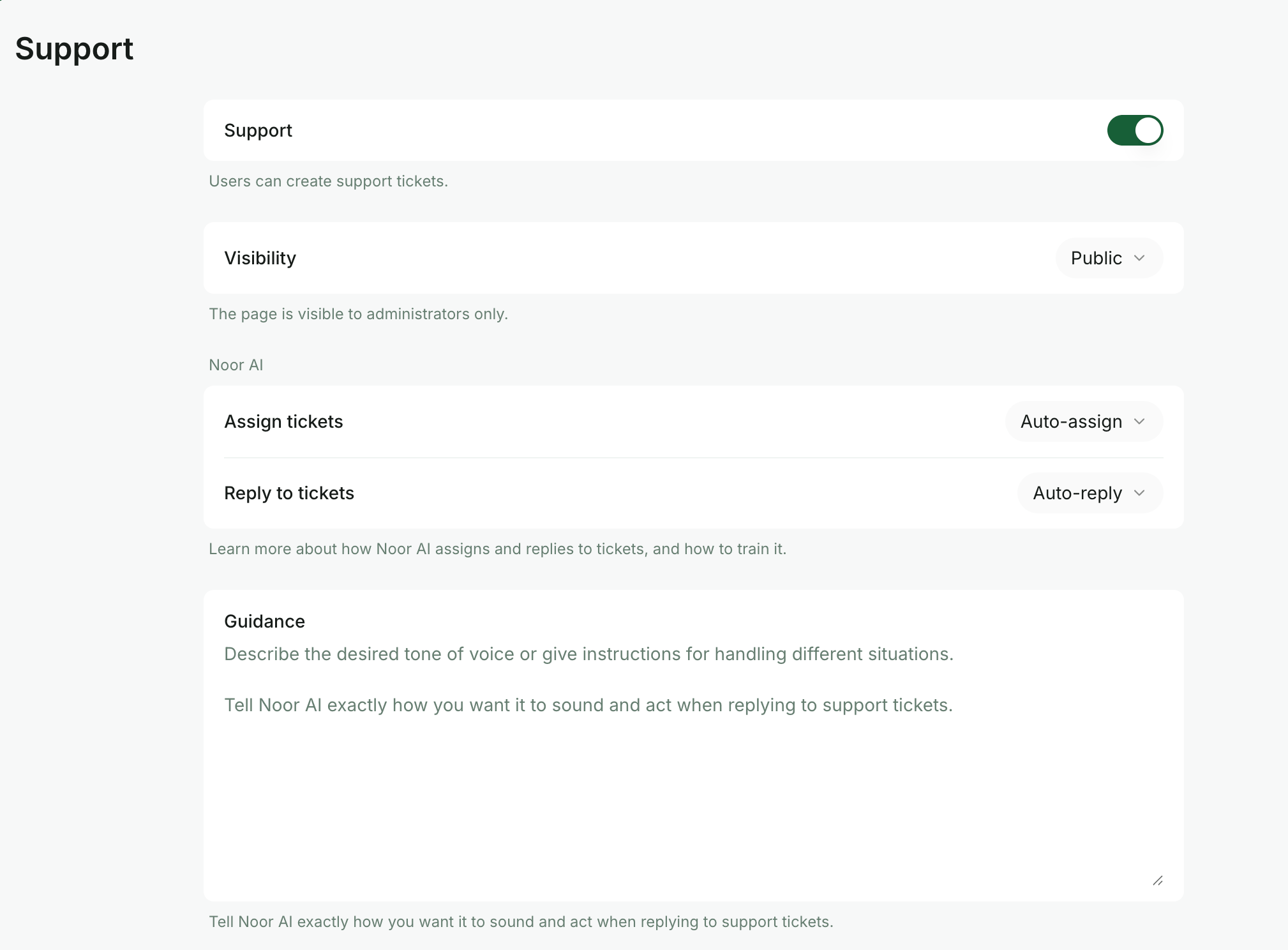 Noor AI for Support is disabled by default.
## Train Noor AI
To get the most out of Noor AI, remember that its performance reflects the quality of your guides. Noor AI can make mistakes, so training it with high-quality data is the best way to ensure smart, reliable support for your space.
* On the **Location settings > Support** page, fill out the **Guidance** field and add all the instructions for Noor AI. Include the general tone of voice, preferred response style, and specific instructions for how Noor AI should behave in different situations.
* [Add common information and FAQs to your location guides](/docs/admin/support/guides). This allows customers to find answers independently via the customer portal, while also ensuring Noor AI has access to the data needed to provide accurate responses.
* Regularly review Noor AI’s interactions and identify frequent questions from your customers. Use these insights to update existing guides or create new ones to fill information gaps. If a response from Noor AI is not accurate, you can delete it just like a regular comment.
## How Noor AI works in Support
### Replying to support tickets
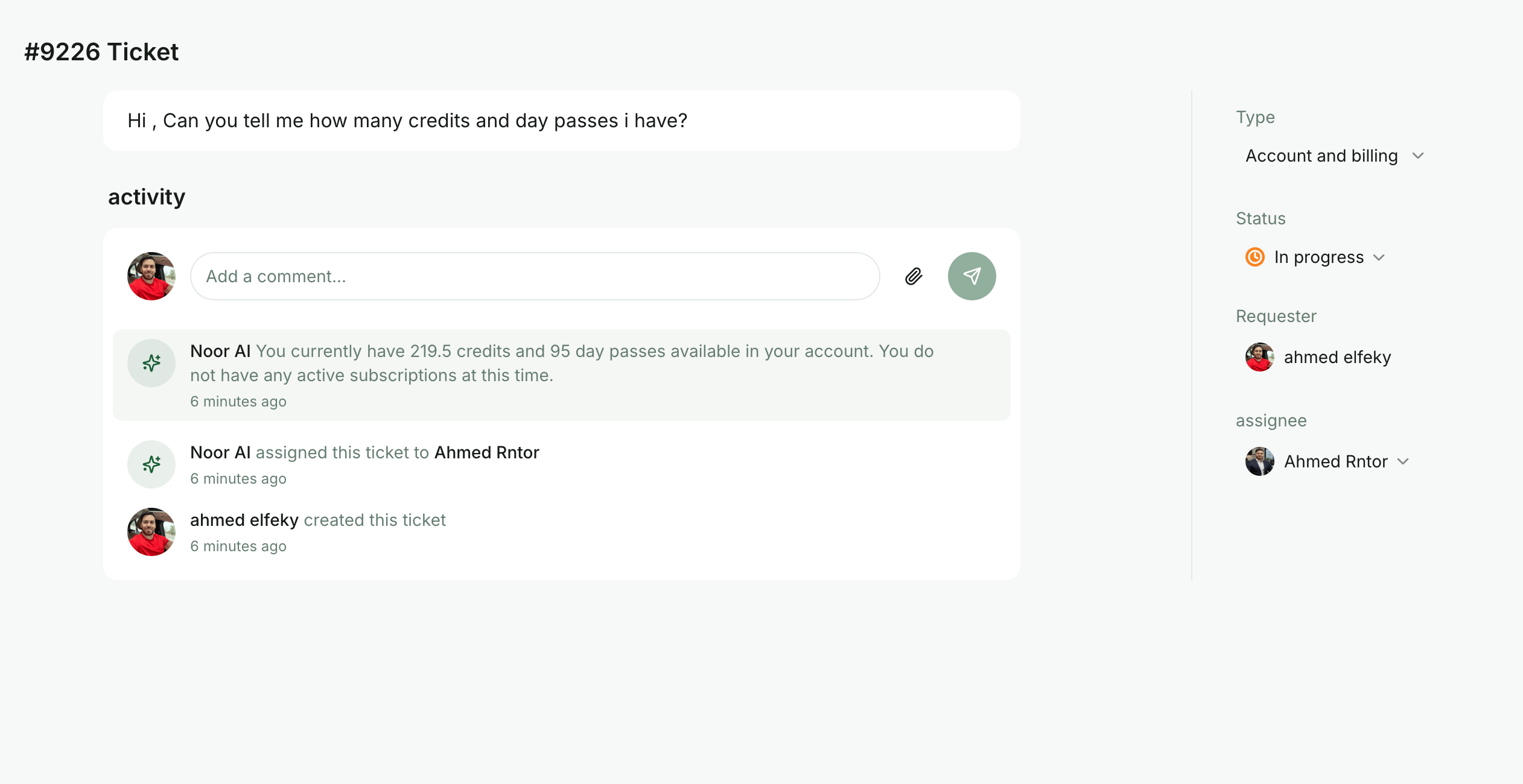
When a customer submits a ticket, Noor AI attempts to provide a timely response. It answers common questions about how the customer portal works—such as bookings, subscriptions, and payments—and also draws on your **In progress**, **Solved**, and **Closed** tickets, location guides, location settings, and the member’s own subscription or membership data.
Noor AI only responds if it is confident it can help accurately. If it lacks confidence, it remains silent and leaves the ticket for your team to handle manually. Noor AI also stays silent after an administrator has replied, so it does not interrupt human support.
Noor AI can communicate in any language it recognizes. If it cannot recognize the user’s language, it will default to answering in English.
To get the best results, keep your location guides up to date and ensure your team’s ticket responses are complete before closing them. Noor AI learns from these interactions to improve future answers. Learn how to train Noor AI.
Noor AI for Support is disabled by default.
## Train Noor AI
To get the most out of Noor AI, remember that its performance reflects the quality of your guides. Noor AI can make mistakes, so training it with high-quality data is the best way to ensure smart, reliable support for your space.
* On the **Location settings > Support** page, fill out the **Guidance** field and add all the instructions for Noor AI. Include the general tone of voice, preferred response style, and specific instructions for how Noor AI should behave in different situations.
* [Add common information and FAQs to your location guides](/docs/admin/support/guides). This allows customers to find answers independently via the customer portal, while also ensuring Noor AI has access to the data needed to provide accurate responses.
* Regularly review Noor AI’s interactions and identify frequent questions from your customers. Use these insights to update existing guides or create new ones to fill information gaps. If a response from Noor AI is not accurate, you can delete it just like a regular comment.
## How Noor AI works in Support
### Replying to support tickets
When a customer submits a ticket, Noor AI attempts to provide a timely response. It answers common questions about how the customer portal works—such as bookings, subscriptions, and payments—and also draws on your **In progress**, **Solved**, and **Closed** tickets, location guides, location settings, and the member’s own subscription or membership data.
Noor AI only responds if it is confident it can help accurately. If it lacks confidence, it remains silent and leaves the ticket for your team to handle manually. Noor AI also stays silent after an administrator has replied, so it does not interrupt human support.
Noor AI can communicate in any language it recognizes. If it cannot recognize the user’s language, it will default to answering in English.
To get the best results, keep your location guides up to date and ensure your team’s ticket responses are complete before closing them. Noor AI learns from these interactions to improve future answers. Learn how to train Noor AI.
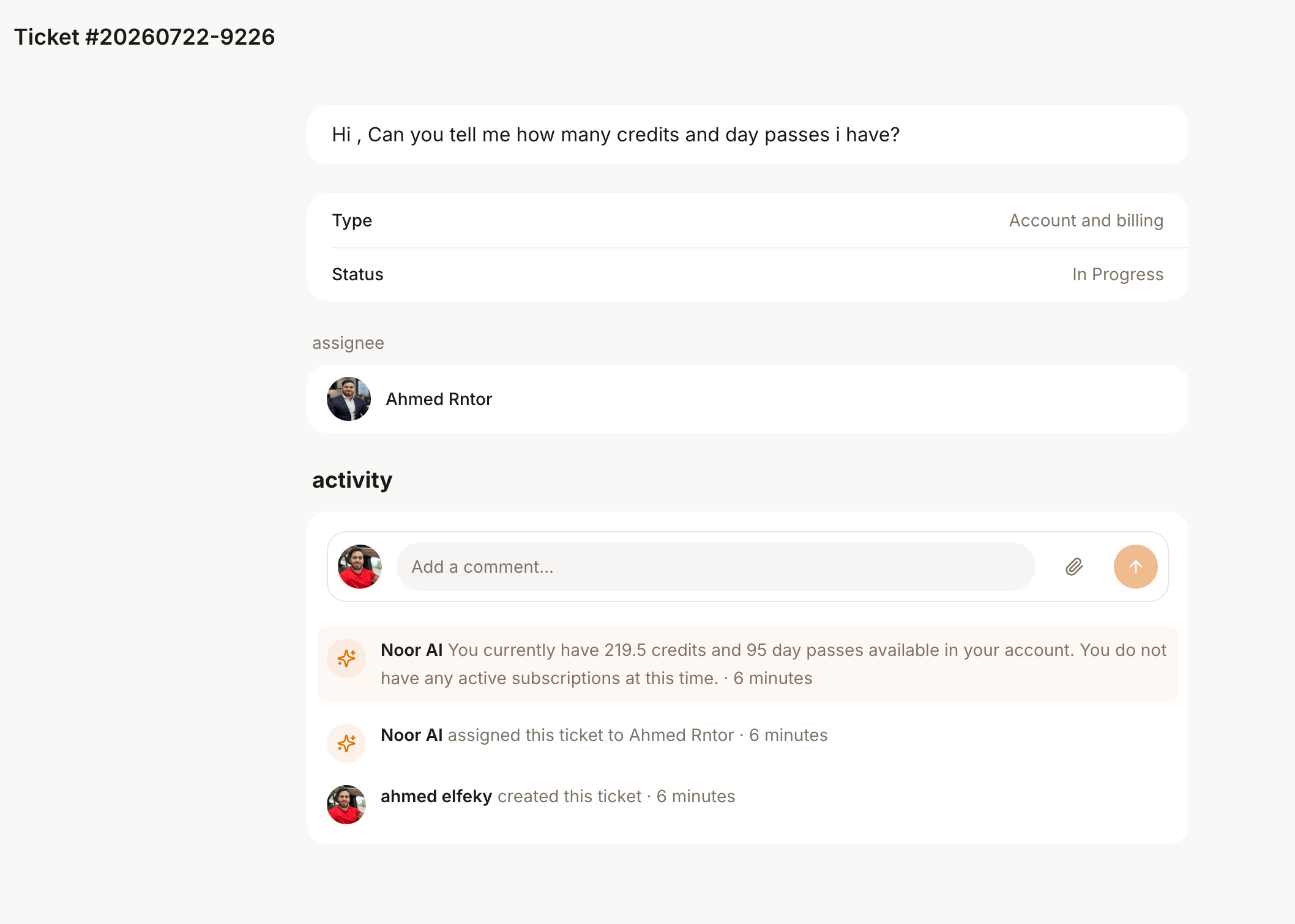 ### Auto-assigning tickets to administrators
Noor AI analyzes past assignment patterns to determine the best administrator for each ticket. This happens independently of Noor AI’s auto-reply feature, meaning Noor AI can assign an administrator and provide the initial reply at the same time.
To calculate the best assignee, Noor AI reviews several factors, including the ticket type, creation date, and which administrator is currently assigned to the most existing tickets.
Auto-assignment is only available if there have been more than two assigned tickets in the location during the past 12 months.
### Auto-assigning tickets to administrators
Noor AI analyzes past assignment patterns to determine the best administrator for each ticket. This happens independently of Noor AI’s auto-reply feature, meaning Noor AI can assign an administrator and provide the initial reply at the same time.
To calculate the best assignee, Noor AI reviews several factors, including the ticket type, creation date, and which administrator is currently assigned to the most existing tickets.
Auto-assignment is only available if there have been more than two assigned tickets in the location during the past 12 months.
 ## Inform members about Noor AI
To ensure a smooth transition and manage member expectations, we recommend being transparent about the introduction of Noor AI in **Support**. Here are a few ways to help members get familiar with Noor AI:
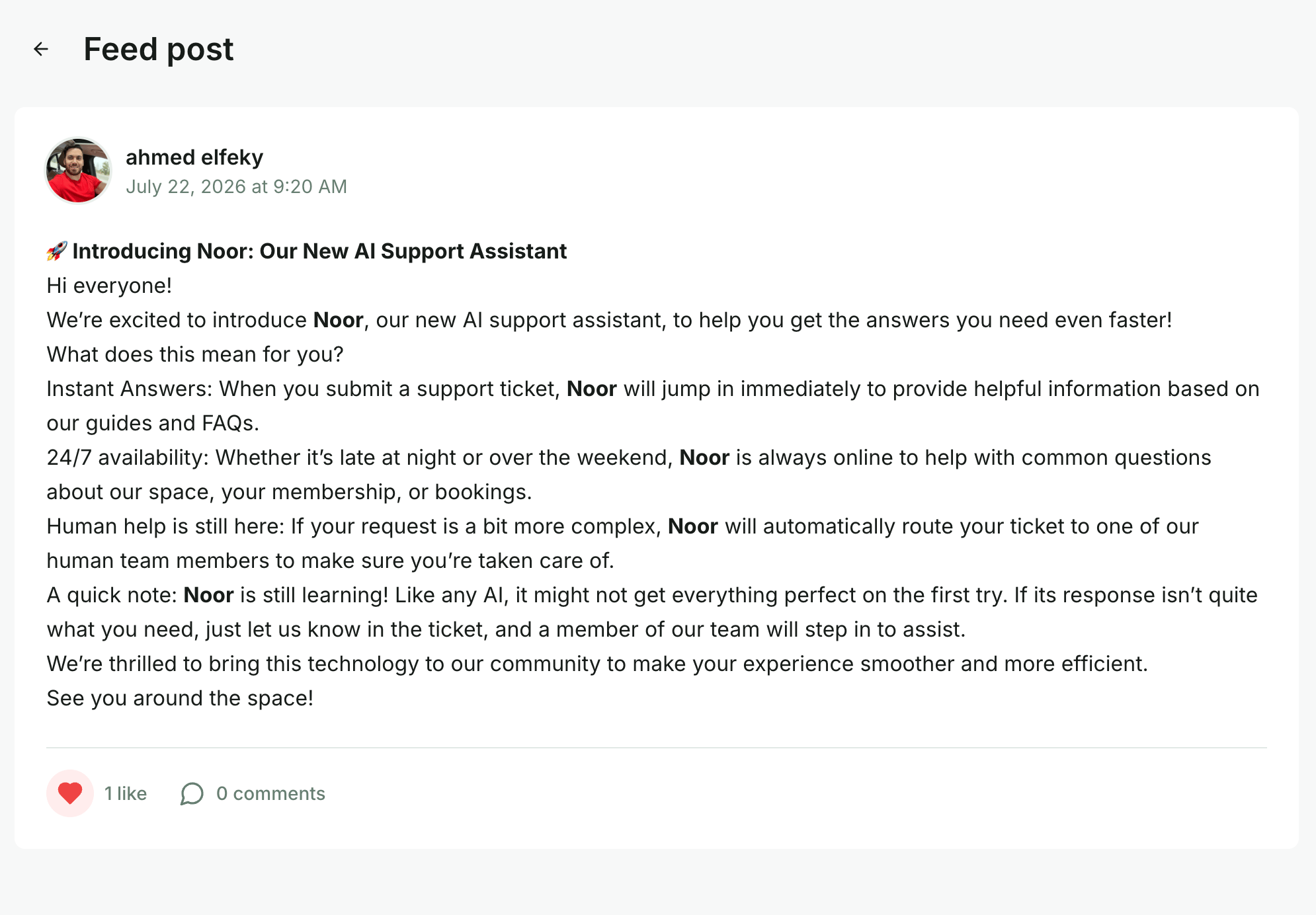
* [Share an update on your Feed](/docs/engagement/feed) introducing Noor AI and explaining how it will help provide faster answers to support tickets.
## Inform members about Noor AI
To ensure a smooth transition and manage member expectations, we recommend being transparent about the introduction of Noor AI in **Support**. Here are a few ways to help members get familiar with Noor AI:
* [Share an update on your Feed](/docs/engagement/feed) introducing Noor AI and explaining how it will help provide faster answers to support tickets.
 * You can also mention Noor AI in your external email newsletters or via printed materials such as posters or desk cards around your space.