> ## Documentation Index
> Fetch the complete documentation index at: https://docs.rntor.com/docs/llms.txt
> Use this file to discover all available pages before exploring further.
# Billing
Customers can access and manage their own billing data and settings in the customer portal, while certain aspects can only be managed by administrators from the admin dashboard.
## How administrators view and manage customer billing
To view and manage a customer's billing data and settings, administrators go to **Customers** > open the user or company profile.
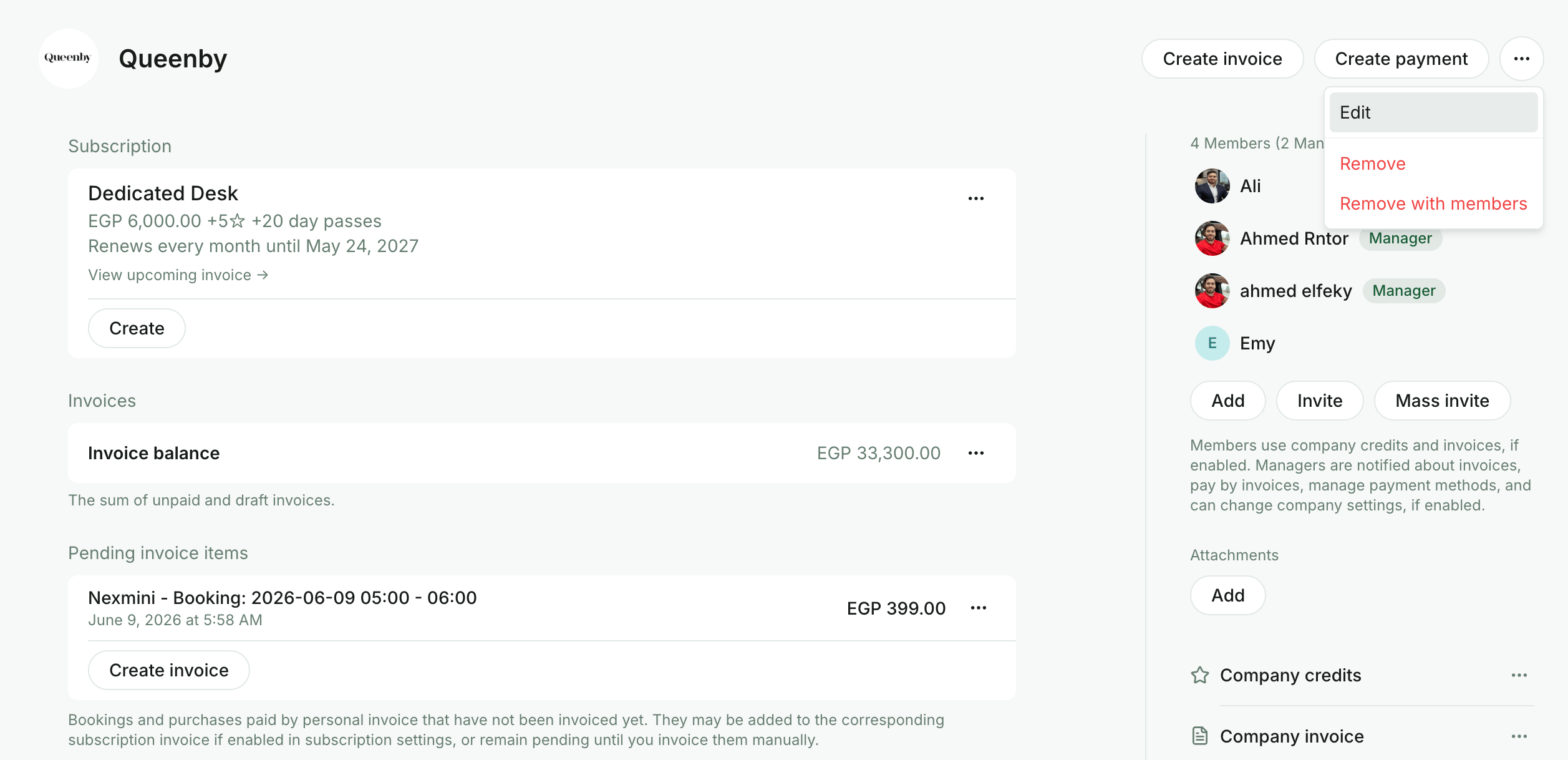
1. For companies, click **(…)** in the top right > `Edit` to update the company name, logo, and contact details.
 2. Open the customer's **subscription** to:
* [Edit it](/docs/admin/billing/subscriptions/edit-a-subscription) based on the new contract terms.
* [Pause payment collection](/docs/admin/billing/subscriptions/control-invoice-issuance) for the customer.
* View the [upcoming invoice](/docs/admin/billing/invoices/upcoming-invoices).
2. Open the customer's **subscription** to:
* [Edit it](/docs/admin/billing/subscriptions/edit-a-subscription) based on the new contract terms.
* [Pause payment collection](/docs/admin/billing/subscriptions/control-invoice-issuance) for the customer.
* View the [upcoming invoice](/docs/admin/billing/invoices/upcoming-invoices).
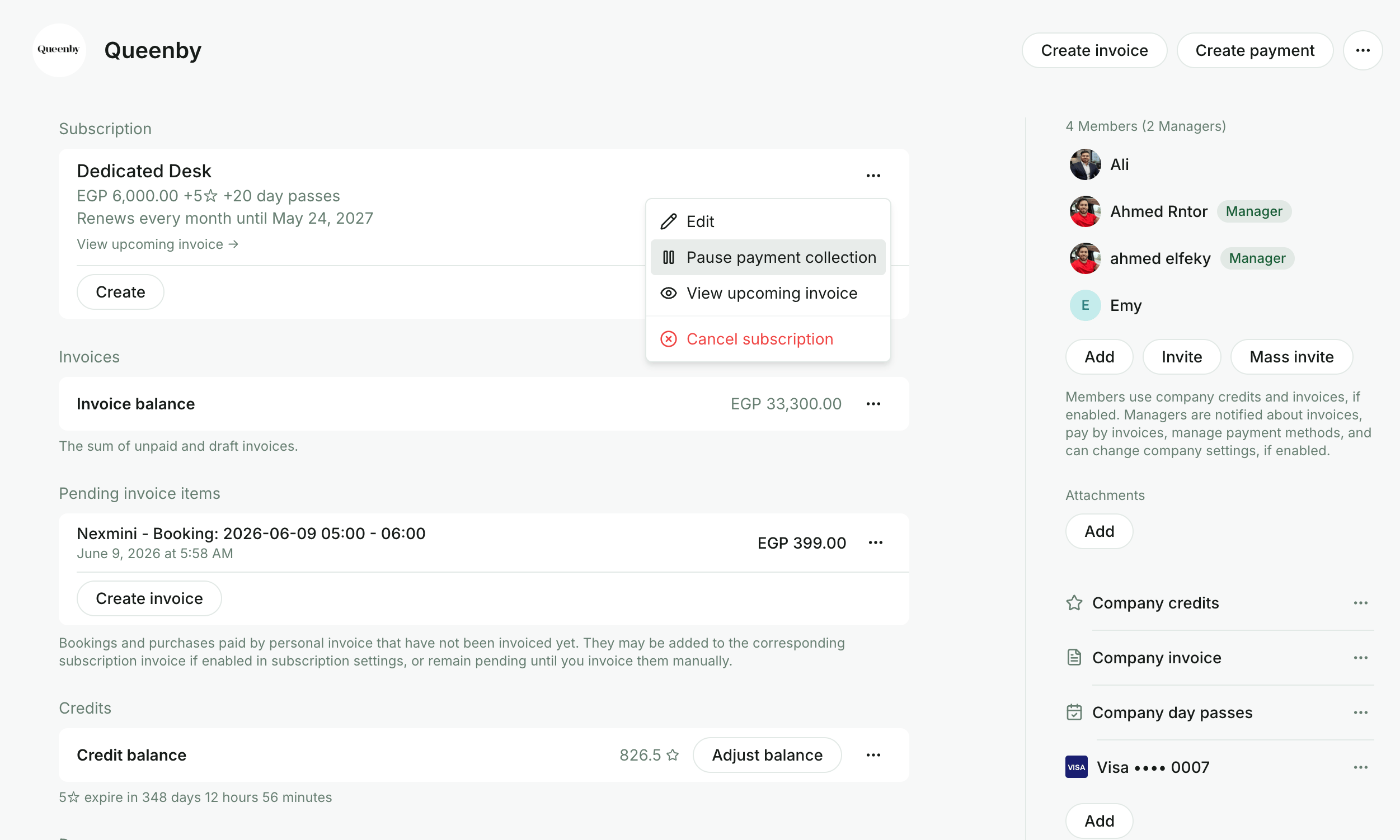 3. Go to the customer's profile to:
* Manage the **"[Pay with invoice](/docs/admin/billing/payments/pay-with-invoice)"** setting via the company-invoice payment method and its [permissions](/docs/admin/customer-management/companies/company-payment-method-permissions) (including the **None** option to disable a specific service entirely).
* [Manage the customer's invoices](/docs/admin/billing/invoices/track-and-manage-invoices) and view [transactions](/docs/admin/billing/payments/payment-gateway).
* [Download invoices](/docs/admin/billing/invoices/download-an-invoice) and [receipts](/docs/admin/billing/payments/receipts).
* Manage pending invoice items.
* View the customer's payment methods and check whether they have a [default one](/docs/admin/billing/payments/payment-gateway).
* Open the customer's payment history in Stripe via the **View in Stripe** button (available when the [Stripe integration](/docs/admin/integrations/payments/stripe/stripe)is connected).
* View or update the [customer's billing details](/docs/admin/customer-management/billing-details).
* For companies, manage the billing email to send company invoices and receipts to an additional recipient apart from the company managers.
* Manage the [**Auto-pay**](/docs/admin/billing/subscriptions/control-invoice-auto-charge) setting.
* Enable and apply an [alternative currency](/docs/admin/billing/currencies) for this customer.
## How company managers view and manage their company billing
Company managers go to **Locations > Membership >** the section with their company name **> Billing**. On this page, they can:
* View and [pay company invoices](/docs/admin/billing/invoices/pay-for-invoice).
* View transactions made with company payment methods.
* [Download invoices](/docs/admin/billing/invoices/download-an-invoice) and [receipts](/docs/admin/billing/payments/receipts).
* [View their company's money balance](/docs/admin/billing/invoices/customer-money-balance).
* Check their current subscription details.
* Check their [upcoming invoice](/docs/admin/billing/invoices/upcoming-invoices).
* [Add a payment method, save it as default, change the default payment method, or delete a payment method.](/docs/admin/billing/payments/payment-gateway)
* [Manage company payment method permissions](/docs/admin/customer-management/companies/company-payment-method-permissions) for company cards, company invoice, credits, and day passes.
* Manage company [billing details](/docs/admin/customer-management/billing-details).
* Manage the company billing email to send invoices and receipts to an additional recipient apart from the company managers.
## How individual users view and manage their billing
Individual users go to **Locations > Membership > Billing** under the "Personal" section. On this page, they can:
* View and [pay their invoices](/docs/admin/billing/invoices/pay-for-invoice), and view transactions.
* [Download invoices](/docs/admin/billing/invoices/download-an-invoice) and [receipts](/docs/admin/billing/payments/receipts).
* [View their money balance](/docs/admin/billing/invoices/customer-money-balance).
* Check their current subscription details.
* Check their [upcoming invoice](/docs/admin/billing/invoices/upcoming-invoices).
* [Add a payment method, save as default, change the default payment method, or delete a payment method.](/docs/admin/billing/payments/payment-gateway)
* Manage their [billing details](/docs/admin/customer-management/billing-details).
3. Go to the customer's profile to:
* Manage the **"[Pay with invoice](/docs/admin/billing/payments/pay-with-invoice)"** setting via the company-invoice payment method and its [permissions](/docs/admin/customer-management/companies/company-payment-method-permissions) (including the **None** option to disable a specific service entirely).
* [Manage the customer's invoices](/docs/admin/billing/invoices/track-and-manage-invoices) and view [transactions](/docs/admin/billing/payments/payment-gateway).
* [Download invoices](/docs/admin/billing/invoices/download-an-invoice) and [receipts](/docs/admin/billing/payments/receipts).
* Manage pending invoice items.
* View the customer's payment methods and check whether they have a [default one](/docs/admin/billing/payments/payment-gateway).
* Open the customer's payment history in Stripe via the **View in Stripe** button (available when the [Stripe integration](/docs/admin/integrations/payments/stripe/stripe)is connected).
* View or update the [customer's billing details](/docs/admin/customer-management/billing-details).
* For companies, manage the billing email to send company invoices and receipts to an additional recipient apart from the company managers.
* Manage the [**Auto-pay**](/docs/admin/billing/subscriptions/control-invoice-auto-charge) setting.
* Enable and apply an [alternative currency](/docs/admin/billing/currencies) for this customer.
## How company managers view and manage their company billing
Company managers go to **Locations > Membership >** the section with their company name **> Billing**. On this page, they can:
* View and [pay company invoices](/docs/admin/billing/invoices/pay-for-invoice).
* View transactions made with company payment methods.
* [Download invoices](/docs/admin/billing/invoices/download-an-invoice) and [receipts](/docs/admin/billing/payments/receipts).
* [View their company's money balance](/docs/admin/billing/invoices/customer-money-balance).
* Check their current subscription details.
* Check their [upcoming invoice](/docs/admin/billing/invoices/upcoming-invoices).
* [Add a payment method, save it as default, change the default payment method, or delete a payment method.](/docs/admin/billing/payments/payment-gateway)
* [Manage company payment method permissions](/docs/admin/customer-management/companies/company-payment-method-permissions) for company cards, company invoice, credits, and day passes.
* Manage company [billing details](/docs/admin/customer-management/billing-details).
* Manage the company billing email to send invoices and receipts to an additional recipient apart from the company managers.
## How individual users view and manage their billing
Individual users go to **Locations > Membership > Billing** under the "Personal" section. On this page, they can:
* View and [pay their invoices](/docs/admin/billing/invoices/pay-for-invoice), and view transactions.
* [Download invoices](/docs/admin/billing/invoices/download-an-invoice) and [receipts](/docs/admin/billing/payments/receipts).
* [View their money balance](/docs/admin/billing/invoices/customer-money-balance).
* Check their current subscription details.
* Check their [upcoming invoice](/docs/admin/billing/invoices/upcoming-invoices).
* [Add a payment method, save as default, change the default payment method, or delete a payment method.](/docs/admin/billing/payments/payment-gateway)
* Manage their [billing details](/docs/admin/customer-management/billing-details).