> ## Documentation Index
> Fetch the complete documentation index at: https://docs.rntor.com/docs/llms.txt
> Use this file to discover all available pages before exploring further.
# Billing cycle anchor
> Set up a billing cycle anchor to define customers’ subscription renewal and billing dates, and manage first-cycle proration
The billing cycle anchor determines the date when a customer's subscription renews and whether proration applies to the first subscription cycle.
The location billing cycle anchor you set defines a default anchor for all new subscriptions. However, when creating a subscription for each specific customer, you can select a different billing cycle anchor if needed.
## Set location default billing cycle anchor
1. Click on settings > **Location settings** > **Billing** > **Subscriptions** tab.
2. In the **Billing cycle anchor** field, select one of the two values:
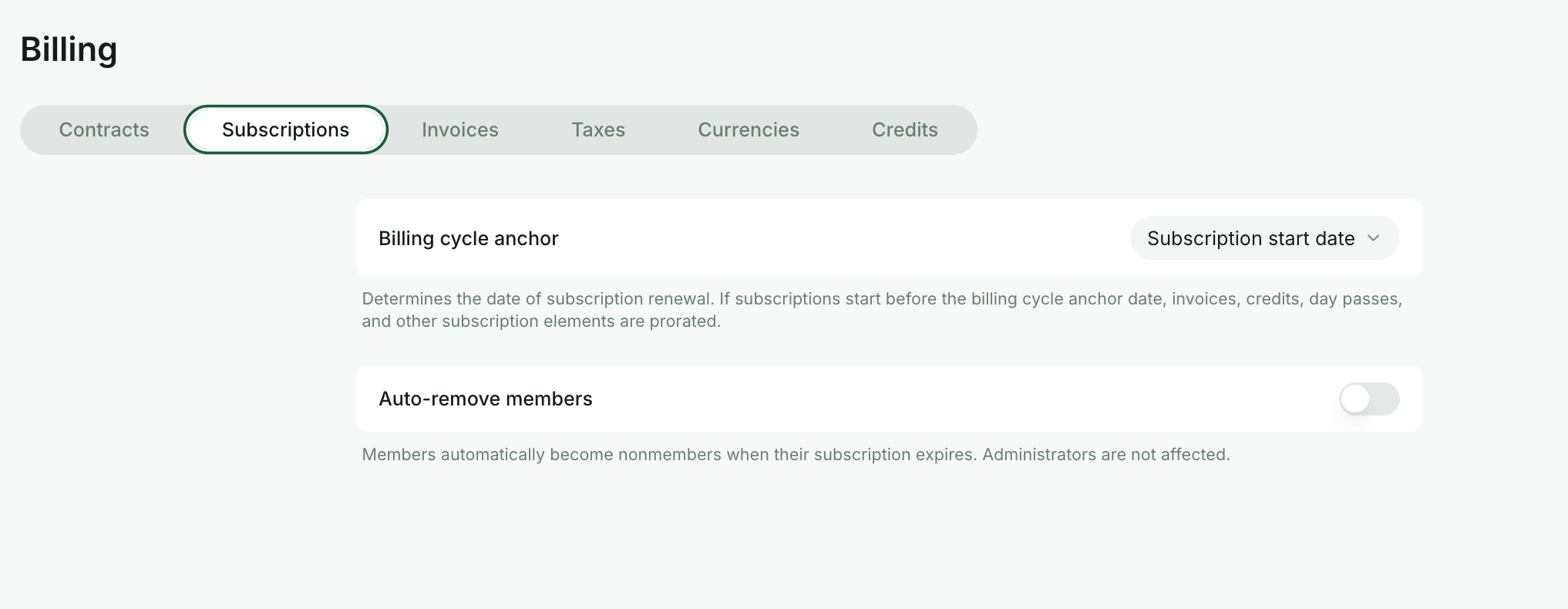 ### Subscription start date
If **Subscription start date** is selected as the billing cycle anchor, the subscription renews, and the customer is billed on the date they subscribed.
* The first subscription cycle is not prorated.
* The customer receives the first invoice with the full price and the full number of credits and day passes.
### First day of the month
If **First day of the month** is selected as the billing cycle anchor, the subscription renews, and the customer is billed on the first day of each month, regardless of the subscription start date. This standardizes renewals on the first of the month and simplifies revenue tracking and accounting. As a result:
* If the customer subscribes on a date other than the first day of the month, the first subscription cycle is incomplete.
* The customer receives a prorated invoice and a prorated number of credits and day passes for the first cycle. [See how the proration coefficient is calculated](/docs/admin/billing/subscriptions/billing-cycle-anchor#how-the-proration-coefficient-is-calculated).
* The subscription renews on the first day of each subsequent month with the full invoice price and full credits and day pass numbers.
When customers [sign up](/docs/docs/admin/billing/plans/immediate-plan-sign-ups) by themselves and the start date isn't the first of the month, **Renewal** is automatically enabled and cannot be disabled. To set a subscription end date, customers must contact an administrator.
A subscription inherits a billing cycle anchor at the moment of creation. If you change the location billing cycle anchor, it will apply only to future subscriptions, while existing subscriptions will continue to renew according to their current billing cycle anchor.
## Set billing cycle anchor for an individual subscription
When [creating a subscription](/docs/admin/billing/subscriptions/set-up-subscriptions#create-a-subscription) for a customer, you can:
* Keep the default location billing cycle anchor.
* Change the billing cycle anchor specifically for that customer's subscription.
### Subscription start date
If **Subscription start date** is selected as the billing cycle anchor, the subscription renews, and the customer is billed on the date they subscribed.
* The first subscription cycle is not prorated.
* The customer receives the first invoice with the full price and the full number of credits and day passes.
### First day of the month
If **First day of the month** is selected as the billing cycle anchor, the subscription renews, and the customer is billed on the first day of each month, regardless of the subscription start date. This standardizes renewals on the first of the month and simplifies revenue tracking and accounting. As a result:
* If the customer subscribes on a date other than the first day of the month, the first subscription cycle is incomplete.
* The customer receives a prorated invoice and a prorated number of credits and day passes for the first cycle. [See how the proration coefficient is calculated](/docs/admin/billing/subscriptions/billing-cycle-anchor#how-the-proration-coefficient-is-calculated).
* The subscription renews on the first day of each subsequent month with the full invoice price and full credits and day pass numbers.
When customers [sign up](/docs/docs/admin/billing/plans/immediate-plan-sign-ups) by themselves and the start date isn't the first of the month, **Renewal** is automatically enabled and cannot be disabled. To set a subscription end date, customers must contact an administrator.
A subscription inherits a billing cycle anchor at the moment of creation. If you change the location billing cycle anchor, it will apply only to future subscriptions, while existing subscriptions will continue to renew according to their current billing cycle anchor.
## Set billing cycle anchor for an individual subscription
When [creating a subscription](/docs/admin/billing/subscriptions/set-up-subscriptions#create-a-subscription) for a customer, you can:
* Keep the default location billing cycle anchor.
* Change the billing cycle anchor specifically for that customer's subscription.
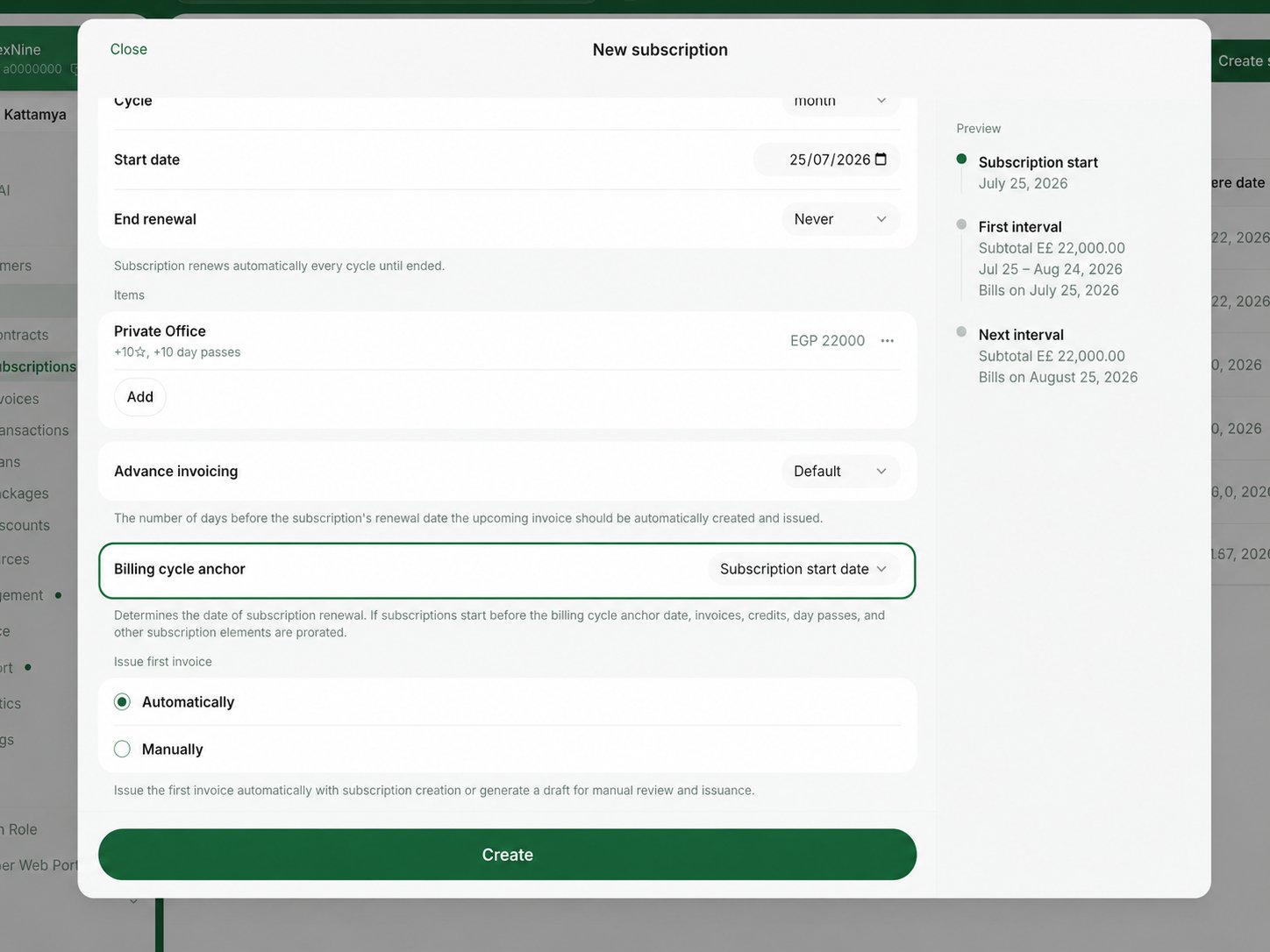 For example, your location billing cycle anchor might be **First day of the month** to align monthly subscription renewals across all customers. Meanwhile, for 3-month, 6-month, or yearly subscriptions, you may want to choose the **Subscription start date** option to avoid first-cycle proration.
## How proration for the last subscription cycle works
When an administrator [sets an end date](/docs/admin/billing/subscriptions/cancel-a-subscription#how-to-schedule-subscription-end-date) that creates a shorter final cycle, the last cycle is prorated automatically. On the final renewal, the customer receives a prorated invoice and a prorated number of credits and day passes for that incomplete cycle.
For weekly plans, the last subscription cycle is prorated whenever it is shorter than a full week.
## How the proration coefficient is calculated
The calculation of the proration coefficient depends on the subscription cycle.
| Subscription cycle | Coefficient calculation | Example |
| ------------------------------- | -------------------------------------------------------------------------------------------- | ------------------------------------------------------------------------------------------------------------------------------------------------------------ |
| **Month** | Days remaining in the month divided by the total number of days in the month. | A subscription starts on Jan 15. Since January has 31 days and 14 days have passed, the coefficient is **(31 - 14) / 31 = 0.548**. |
| **3 months, 6 months, or Year** | Days remaining in the current period divided by the total number of days in the past period. | A 3-month subscription starts on Mar 20. Since 12 days remain in the current period and the past period has 90 days, the coefficient is **12 / 90 = 0.133**. |
The proration coefficient is then multiplied by the full membership price. Any applicable taxes you've set **are not** included in this amount.
Both the invoice total and any applicable credits and day passes are adjusted proportionally based on the proration coefficient.
```text theme={null}
```
For example, your location billing cycle anchor might be **First day of the month** to align monthly subscription renewals across all customers. Meanwhile, for 3-month, 6-month, or yearly subscriptions, you may want to choose the **Subscription start date** option to avoid first-cycle proration.
## How proration for the last subscription cycle works
When an administrator [sets an end date](/docs/admin/billing/subscriptions/cancel-a-subscription#how-to-schedule-subscription-end-date) that creates a shorter final cycle, the last cycle is prorated automatically. On the final renewal, the customer receives a prorated invoice and a prorated number of credits and day passes for that incomplete cycle.
For weekly plans, the last subscription cycle is prorated whenever it is shorter than a full week.
## How the proration coefficient is calculated
The calculation of the proration coefficient depends on the subscription cycle.
| Subscription cycle | Coefficient calculation | Example |
| ------------------------------- | -------------------------------------------------------------------------------------------- | ------------------------------------------------------------------------------------------------------------------------------------------------------------ |
| **Month** | Days remaining in the month divided by the total number of days in the month. | A subscription starts on Jan 15. Since January has 31 days and 14 days have passed, the coefficient is **(31 - 14) / 31 = 0.548**. |
| **3 months, 6 months, or Year** | Days remaining in the current period divided by the total number of days in the past period. | A 3-month subscription starts on Mar 20. Since 12 days remain in the current period and the past period has 90 days, the coefficient is **12 / 90 = 0.133**. |
The proration coefficient is then multiplied by the full membership price. Any applicable taxes you've set **are not** included in this amount.
Both the invoice total and any applicable credits and day passes are adjusted proportionally based on the proration coefficient.
```text theme={null}
```