> ## Documentation Index
> Fetch the complete documentation index at: https://docs.rntor.com/docs/llms.txt
> Use this file to discover all available pages before exploring further.
# Payment methods
> Understand the available payment methods: credits, day passes, invoices, saved cards and bank accounts, and admin-only free and external methods
When making a booking or purchase, users can use different payment methods. The payment methods available for administrators slightly differ. Administrators have exclusive access to certain methods like **Free** and **External** payments, which are designed for specific scenarios.
| Payment method | Available in admin portal | Available in member portal |
| ----------------------------------------------- | :-----------------------: | :------------------------: |
| **Free** | ✓ | |
| **External** | ✓ | |
| **Credits** | ✓ | ✓ (only for members) |
| **Day passes** | ✓ | ✓ (only for members) |
| **Invoice** | ✓ | ✓ |
| **Saved payment method** (card or bank account) | ✓ | ✓ |
| **New payment method** | | ✓ |
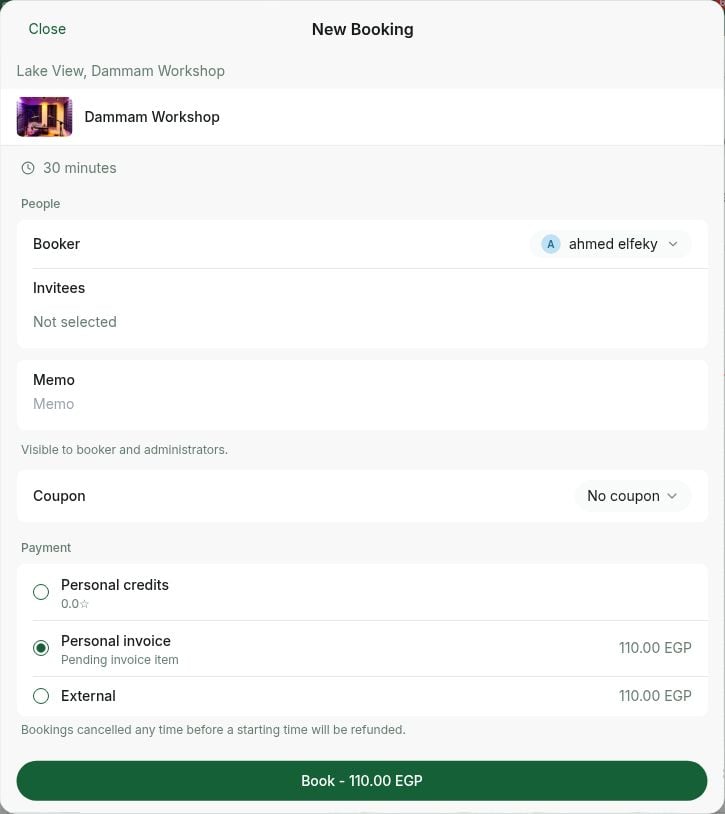 ## Free payment method
* The **Free** payment method is exclusively available in admin portal to administrators [with the Bookings permission](/docs/admin/administration/administrators/permissions).
* It allows administrators to make bookings for themselves or for customers for free, without any monetary or credit deduction.
## External payment method
* The [External payment method](/docs/admin/billing/payments/external) is exclusively available to administrators in admin portal when making bookings for customers.
* It serves to record payments received outside of RNTOR.
## Credits
* The [Credits payment method](/docs/admin/billing/credits-and-day-passes/credits) is available for members for bookings, event tickets, and shop orders if:
* Credits are enabled for the location.
* The service has a credit price set.
* The member has been allocated or purchased credits.
* Administrators can also use credits when making a booking for a member who has credits.
There are two types of credits:
* **Personal credits** are usable by individual members.
* **Company credits** are usable by company members and managers. For company members, this permission is subject to [company payment method permissions](/docs/admin/customer-management/companies/company-payment-method-permissions).
## Day passes
* The [Day Passes payment method](/docs/admin/billing/credits-and-day-passes/day-passes) appears for members for hot desk bookings if:
* Day passes are enabled for the location.
* The specific hot desk has the **Day Passes** option enabled.
* The member has a personal or company subscription with day passes.
* Administrators can also use day passes when making a booking for a member who has day passes.
There are two types of day passes:
* **Personal day passes** are usable by individual members.
* **Company day passes** are usable by company members and managers. For company members, this permission is subject to [company settings](/docs/admin/customer-management/companies/company-payment-method-permissions).
## Invoice
* The **Invoice** payment method allows including payments in an invoice rather than immediate payment.
* Customers can use the **Invoice** payment method for bookings, event tickets, shop orders, and credit package purchases if they have [Pay with invoice](/docs/admin/billing/payments/pay-with-invoice) enabled.
* Administrators can use the [Invoice payment method](/docs/admin/billing/payments/pay-with-invoice) when making a booking for any customer.
There are two types of the **Invoice** payment method:
* **Personal invoice** is usable by individual customers.
* **Company invoice** is usable by company members and managers. For company members, this permission is subject to [company settings](/docs/admin/customer-management/companies/company-payment-method-permissions).
## New payment method
* The **New payment method** option is available to all users in the member web portal and mobile app if:
* A [payment gateway](/docs/admin/billing/payments/payment-gateway) is connected.
* The resource or service has the **Money** switch enabled with a monetary price set.
* It allows users to enter new payment details for immediate transactions.
## Saved payment method
### Saved credit card
* The saved credit card appears for users for all types of payments if:
* They have made at least one previous payment or [manually added](/docs/admin/billing/payments/payment-gateway#add-a-payment-method) their card details.
* Your connected payment gateway [supports saving payment methods](/docs/admin/billing/payments/payment-gateway#manage-payment-methods).
* Administrators can also use customers’ saved cards for making a booking on behalf of a customer, charging the customer’s invoices, or [creating one-off payments](/docs/admin/billing/payments/create-one-off-payments) in RNTOR.
### Saved bank account
* A saved bank account appears specifically for invoice payments if:
* You have a payment gateway connected that supports saved bank accounts.
* The customer has made at least one previous payment or [manually added](/docs/admin/billing/payments/payment-gateway#add-a-payment-method) their bank account details.
* Administrators can also use customers’ saved bank accounts for charging the customer’s invoices.
## FAQs
When booking on behalf of a member, administrators can use the following payment methods:
* [External](/docs/admin/billing/payments/external)
* Member’s personal or company credits
* Member’s personal or company day passes
* Member’s personal or company invoice
* Member’s saved payment methods
When booking on behalf of a nonmember, the following payment methods are available for administrators:
* [External](/docs/admin/billing/payments/external)
* [Personal invoice](/docs/admin/billing/payments/pay-with-invoice)
* Nonmember’s saved payment methods
1. [Add them as an administrator](/docs/admin/administration/administrators/administrators) with the [Bookings permission](/docs/admin/administration/administrators/permissions).
2. When administrators book a room, desk, or other resource, they have a **Free** payment method.
## Free payment method
* The **Free** payment method is exclusively available in admin portal to administrators [with the Bookings permission](/docs/admin/administration/administrators/permissions).
* It allows administrators to make bookings for themselves or for customers for free, without any monetary or credit deduction.
## External payment method
* The [External payment method](/docs/admin/billing/payments/external) is exclusively available to administrators in admin portal when making bookings for customers.
* It serves to record payments received outside of RNTOR.
## Credits
* The [Credits payment method](/docs/admin/billing/credits-and-day-passes/credits) is available for members for bookings, event tickets, and shop orders if:
* Credits are enabled for the location.
* The service has a credit price set.
* The member has been allocated or purchased credits.
* Administrators can also use credits when making a booking for a member who has credits.
There are two types of credits:
* **Personal credits** are usable by individual members.
* **Company credits** are usable by company members and managers. For company members, this permission is subject to [company payment method permissions](/docs/admin/customer-management/companies/company-payment-method-permissions).
## Day passes
* The [Day Passes payment method](/docs/admin/billing/credits-and-day-passes/day-passes) appears for members for hot desk bookings if:
* Day passes are enabled for the location.
* The specific hot desk has the **Day Passes** option enabled.
* The member has a personal or company subscription with day passes.
* Administrators can also use day passes when making a booking for a member who has day passes.
There are two types of day passes:
* **Personal day passes** are usable by individual members.
* **Company day passes** are usable by company members and managers. For company members, this permission is subject to [company settings](/docs/admin/customer-management/companies/company-payment-method-permissions).
## Invoice
* The **Invoice** payment method allows including payments in an invoice rather than immediate payment.
* Customers can use the **Invoice** payment method for bookings, event tickets, shop orders, and credit package purchases if they have [Pay with invoice](/docs/admin/billing/payments/pay-with-invoice) enabled.
* Administrators can use the [Invoice payment method](/docs/admin/billing/payments/pay-with-invoice) when making a booking for any customer.
There are two types of the **Invoice** payment method:
* **Personal invoice** is usable by individual customers.
* **Company invoice** is usable by company members and managers. For company members, this permission is subject to [company settings](/docs/admin/customer-management/companies/company-payment-method-permissions).
## New payment method
* The **New payment method** option is available to all users in the member web portal and mobile app if:
* A [payment gateway](/docs/admin/billing/payments/payment-gateway) is connected.
* The resource or service has the **Money** switch enabled with a monetary price set.
* It allows users to enter new payment details for immediate transactions.
## Saved payment method
### Saved credit card
* The saved credit card appears for users for all types of payments if:
* They have made at least one previous payment or [manually added](/docs/admin/billing/payments/payment-gateway#add-a-payment-method) their card details.
* Your connected payment gateway [supports saving payment methods](/docs/admin/billing/payments/payment-gateway#manage-payment-methods).
* Administrators can also use customers’ saved cards for making a booking on behalf of a customer, charging the customer’s invoices, or [creating one-off payments](/docs/admin/billing/payments/create-one-off-payments) in RNTOR.
### Saved bank account
* A saved bank account appears specifically for invoice payments if:
* You have a payment gateway connected that supports saved bank accounts.
* The customer has made at least one previous payment or [manually added](/docs/admin/billing/payments/payment-gateway#add-a-payment-method) their bank account details.
* Administrators can also use customers’ saved bank accounts for charging the customer’s invoices.
## FAQs
When booking on behalf of a member, administrators can use the following payment methods:
* [External](/docs/admin/billing/payments/external)
* Member’s personal or company credits
* Member’s personal or company day passes
* Member’s personal or company invoice
* Member’s saved payment methods
When booking on behalf of a nonmember, the following payment methods are available for administrators:
* [External](/docs/admin/billing/payments/external)
* [Personal invoice](/docs/admin/billing/payments/pay-with-invoice)
* Nonmember’s saved payment methods
1. [Add them as an administrator](/docs/admin/administration/administrators/administrators) with the [Bookings permission](/docs/admin/administration/administrators/permissions).
2. When administrators book a room, desk, or other resource, they have a **Free** payment method.