> ## Documentation Index
> Fetch the complete documentation index at: https://docs.rntor.com/docs/llms.txt
> Use this file to discover all available pages before exploring further.
# API & webhooks
> Access RNTOR API and webhook add-on to build custom integrations and automated workflows with third-party platforms
Build your custom workflows and integrations between RNTOR and other third-party platforms using the RNTOR API and webhooks.
## Get access to API & webhooks
The [owner](/docs/admin/administration/administrators/owner) should follow these steps:
1. Click your network name in the top left corner.
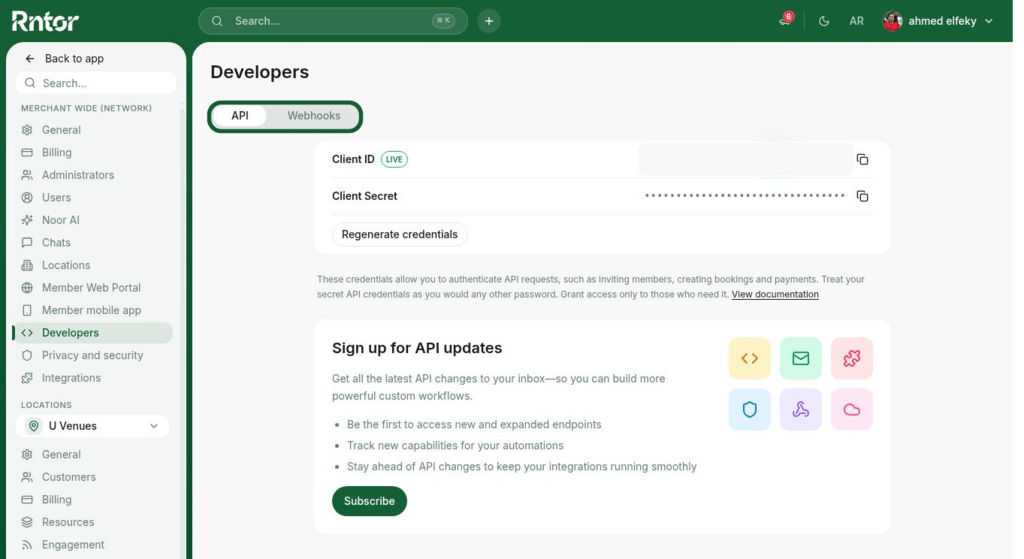
2. Go to **Network settings** > **Developers** page.
3. If you haven't yet, [sign up for the API & webhooks add-on](/docs/admin/administration/billing/make-changes-to-rntor-subscription).
4. Copy the Client ID and Client Secret.
5. Use our documentation:
* [API documentation and developer contacts](/docs/api-reference/authentication)
* [Webhook documentation](/docs/webhooks/introduction)
 If you have any API-related questions or run into issues, feel free to reach out to our team at [api@rntor.com](mailto:api@rntor.com).
## How API & webhooks work
**API**
* Acts as a two-way bridge, allowing your external software (like a CRM or access control system) to request information from and send commands to RNTOR.
* Enables you to build customized workflows and a cohesive tech stack by directly connecting RNTOR with your third-party platforms.
**Webhooks**
* Function as automated, real-time notifications from RNTOR to your application.
* RNTOR sends a webhook to a URL you specify whenever a particular event occurs in your network (e.g., a new booking is created, a user is added, a subscription ends).
* This ensures your connected systems are instantly updated without constant polling.
## Regenerate API credentials
For safety reasons, you might need to hide your credentials from someone who got access to them previously. In this case, the [owner](/docs/admin/administration/administrators/owner) can regenerate API credentials, and nobody except the owner will see them:
1. Click your network name in the top left corner.
2. Go to **Network settings** > **Developers** page.
3. Press **Regenerate credentials**.
After regenerating, the previous API credentials will become invalid, and nobody can access the API with them anymore.
If you have any API-related questions or run into issues, feel free to reach out to our team at [api@rntor.com](mailto:api@rntor.com).
## How API & webhooks work
**API**
* Acts as a two-way bridge, allowing your external software (like a CRM or access control system) to request information from and send commands to RNTOR.
* Enables you to build customized workflows and a cohesive tech stack by directly connecting RNTOR with your third-party platforms.
**Webhooks**
* Function as automated, real-time notifications from RNTOR to your application.
* RNTOR sends a webhook to a URL you specify whenever a particular event occurs in your network (e.g., a new booking is created, a user is added, a subscription ends).
* This ensures your connected systems are instantly updated without constant polling.
## Regenerate API credentials
For safety reasons, you might need to hide your credentials from someone who got access to them previously. In this case, the [owner](/docs/admin/administration/administrators/owner) can regenerate API credentials, and nobody except the owner will see them:
1. Click your network name in the top left corner.
2. Go to **Network settings** > **Developers** page.
3. Press **Regenerate credentials**.
After regenerating, the previous API credentials will become invalid, and nobody can access the API with them anymore.